
Play, score and
track results with
Bridgemate
Score and follow your bridge games with Bridgemates
or the Bridgemate app. Combine with Bridgemate Play
to play from home or at the club. Take control of a
whole new club experience.
Discover why Bridgemate is the most
comprehensive solution for your club
Easy scoring for all your
bridge games
Bridgemate is the world's most popular wireless scoring system for bridge clubs and tournaments. Its user-friendliness, functionality and reliability are unrivalled and lifts any club to a higher level.
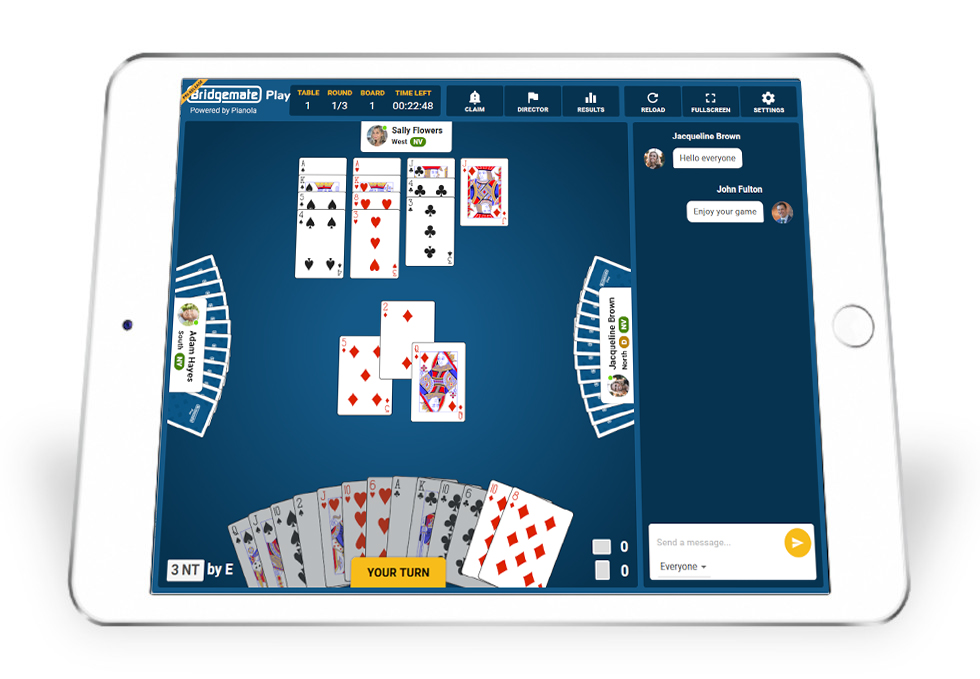
Create a hybrid club with Bridgemate Play
Bridgemate Play enables you to create
a true hybrid bridge club, where face-to-face club players play together with online participants
in one big club game.
Use the Bridgemate app to score your club game
Use the Bridgemate app on your mobile phone to follow your results or enter scores instead of using Bridgemates. Or combine Bridgemates and the Bridgemate app and score as you prefer.
Bridgemate Play
Combine online play and face-to-face play in one hybrid club game
Learn more about Bridgemate Play >
PRICES
Find out more about pricing
and availability of Bridgemate products and services.
LOCATE YOUR DEALER
Find the nearest Bridgemate
distributor to your club.
Read more ›
SUPPORT QUESTIONS?
Visit the Bridgemate support center for help with Bridgemate products and services, and download drivers, software and manuals.
CLUB LOGIN
Log in to your Bridgemate club account and manage the Bridgemate app and other Bridgemate services.
Latest news
Our partners

 Bridgemate is the official scoring system of the European Bridge League and World Bridge Federation